ScorePlayer syncronizes SVG music notation animation with audio recordings. While the audio plays, the current beat is highlighted.
Playback location can be set by clicking on any measure in the music notation.
Measures and phrases can be looped.
The Control Panel includes buttons and sliders for playback speed and location, notation zoom/scale, audio volume, and looping.
ScorePlayer is pure javascript and html5 on the client, with MySQL and PHP on the server.
SVG music notation was exported from MuseScore, and formatted for this application.
Control Panel

Speed

Slider controls the speed of playback without affecting pitch. Otherwise known as Audio Time Stretching.
Click speed to reset to 100%.
Zoom

Slider controls the size of the HTML5 SVG music notation.
Click zoom to reset to 100%, the original size.
Volume

Slider controls the audio volume.
Click the speaker icon to mute and unmute audio.
Transport

Click  to play and pause audio (or press keyboard space bar).
Slider controls the audio and score location, while audio is paused.
Use the slider to select a specific measure repetition, when repeats are involved.
Keyboard shortcuts:
- Space bar controls play and pause.
- Left and Right keys move audio and score location to the previous or next measure.
Loop
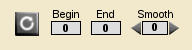
Click  to enable looping. Audio will play only within the range set in Begin and End.
Click Begin to set the loop start measure to the current, shaded measure.
Click End to set the loop end measure to the current, shaded measure.
Usage: first select a measure, then click Begin or End.
Smooth control adds or subtracts milliseconds to the End point.
Keyboard shortcuts:
- "l" key controls the loop button.
- Shift key sets both Begin and End to the current, shaded measure.
- Shift-Left and Shift-Right selects a span of measures.
- Click on a measure while holding the Shift key to set Begin and End